 Star Repo
Adding payment option to cart
Forum rules
Always add your Aimeos and PHP version as well as your environment (Linux/Mac/Win)
Spam and unrelated posts will be removed immediately!
Always add your Aimeos and PHP version as well as your environment (Linux/Mac/Win)
Spam and unrelated posts will be removed immediately!

Adding payment option to cart
I am trying to add a payment option to the cart using this link:
https://aimeos.org/docs/latest/frontend ... -services/
But I fail.
Can you check the picture and tell what am I doing wrong.
I am supplying only service.id because I feel like the other attributes are not mandatory.
Picture:
https://aimeos.org/docs/latest/frontend ... -services/
But I fail.
Can you check the picture and tell what am I doing wrong.
I am supplying only service.id because I feel like the other attributes are not mandatory.
Picture:
Re: Adding payment option to cart
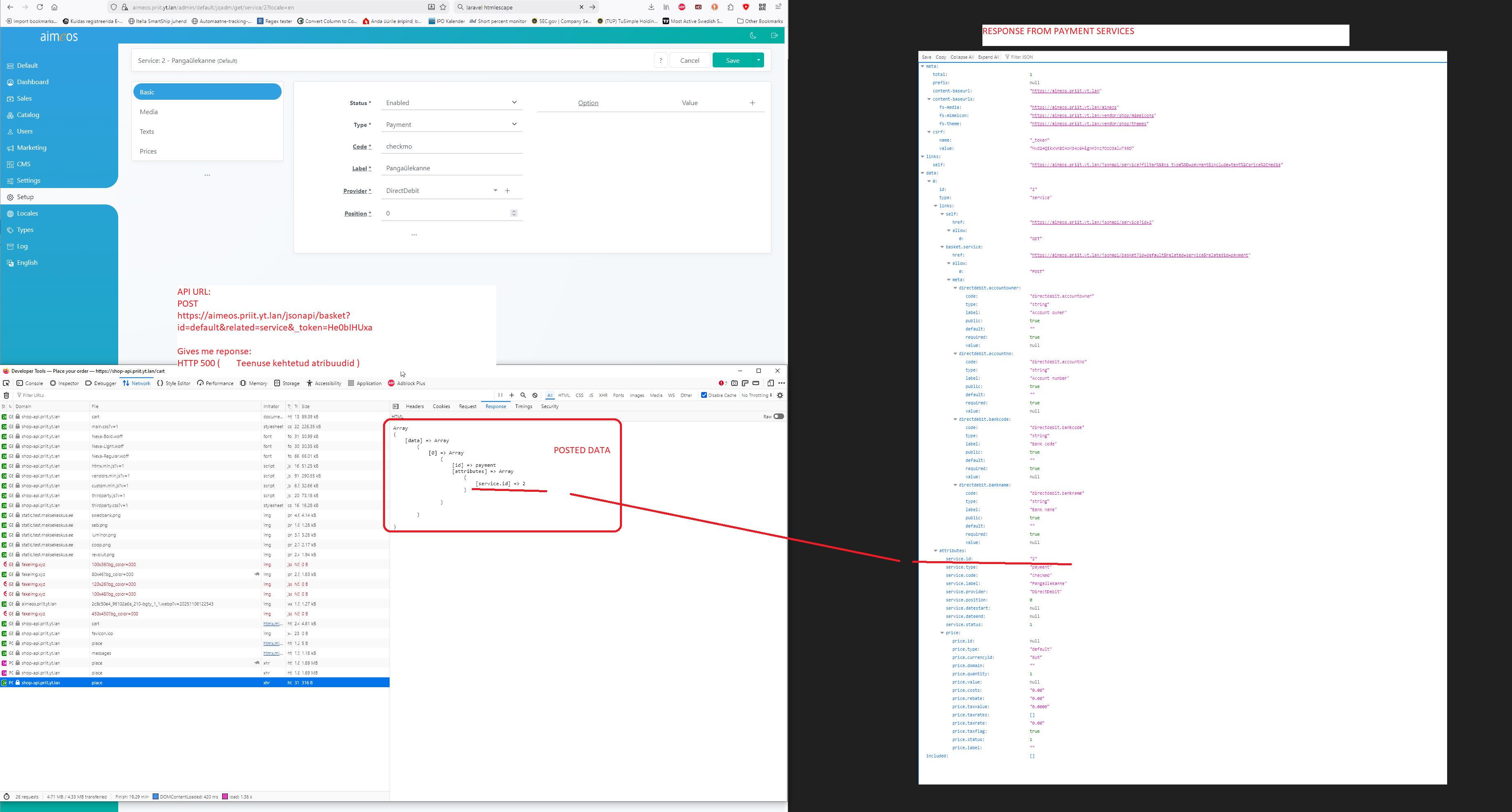
Posted data:
Post URL:
Response HTTP500 with original Aimeos Server saying in the logs:
Code: Select all
{"data":[{"id":"payment","attributes":{"service.id":"2"}}]}Code: Select all
https://aimeos.priit.yt.lan/jsonapi/basket?id=default&related=service&relatedid=payment&_token=He0bIHUxa4vlT2z2zpjhvFDddeOsjXVfctCo0bfFCode: Select all
Teenuse kehtetud atribuudid
#0 /home/developer/sites/aimeos_main/vendor/aimeos/ai-controller-frontend/src/Controller/Frontend/Basket/Decorator/
Re: Adding payment option to cart
Ok, fiddled with the code inside file:
And came up with errors like these:
Where can I enter these? I can not see any fields in admin panel for them.
Also how can I make aimeos more informative? Do not want to manually edit files to get actual error causes.
Code: Select all
~/vendor/aimeos/ai-controller-frontend/src/Controller/Frontend/Basket/Standard.phpCode: Select all
[2026-01-01 12:53:33] local.DEBUG: body: ["<pre>Array
(
[directdebit.accountowner] => Configuration for "directdebit.accountowner" is missing
[directdebit.accountno] => Configuration for "directdebit.accountno" is missing
[directdebit.bankcode] => Configuration for "directdebit.bankcode" is missing
[directdebit.bankname] => Configuration for "directdebit.bankname" is missing
)
</pre>"]
Also how can I make aimeos more informative? Do not want to manually edit files to get actual error causes.
Re: Adding payment option to cart
I changed payment to "PostPay" and now I managed to set the payment option.
Finally managed to place first order over the API.
But I would like to do it in such a way that I make shipping cost = 0, but actual shipping line item would be added on top of order as separate invoice row line.
Same would apply to payment option.
Is there an easy way to do this?
Finally managed to place first order over the API.
But I would like to do it in such a way that I make shipping cost = 0, but actual shipping line item would be added on top of order as separate invoice row line.
Same would apply to payment option.
Is there an easy way to do this?

Re: Adding payment option to cart
The shipping costs depend on the delivery item you've added to the basket.
There may be a shipping and/or payment costs line in the basket depending on the selected service items.
There may be a shipping and/or payment costs line in the basket depending on the selected service items.
Professional support and custom implementation are available at Aimeos.com
If you like Aimeos, give us a star
If you like Aimeos,
give us a starRe: Adding payment option to cart
Well, I would like to take a bit another approach.
Make shipping+payment services always 0 and the actual shipping/payment selection would be on my API connection page.
Once the customer confirms the order, it would add in cart 2 extra products (one shipping, one payment) that would represent the actual selected service with needed extra data such as selected pickup location or selected payment option.
Making all the needed shipping-payment services work on the Aimeos installation itself seems like too much hassle, because if a person selects a pickup location, then we should not ask a full address details from the customer.
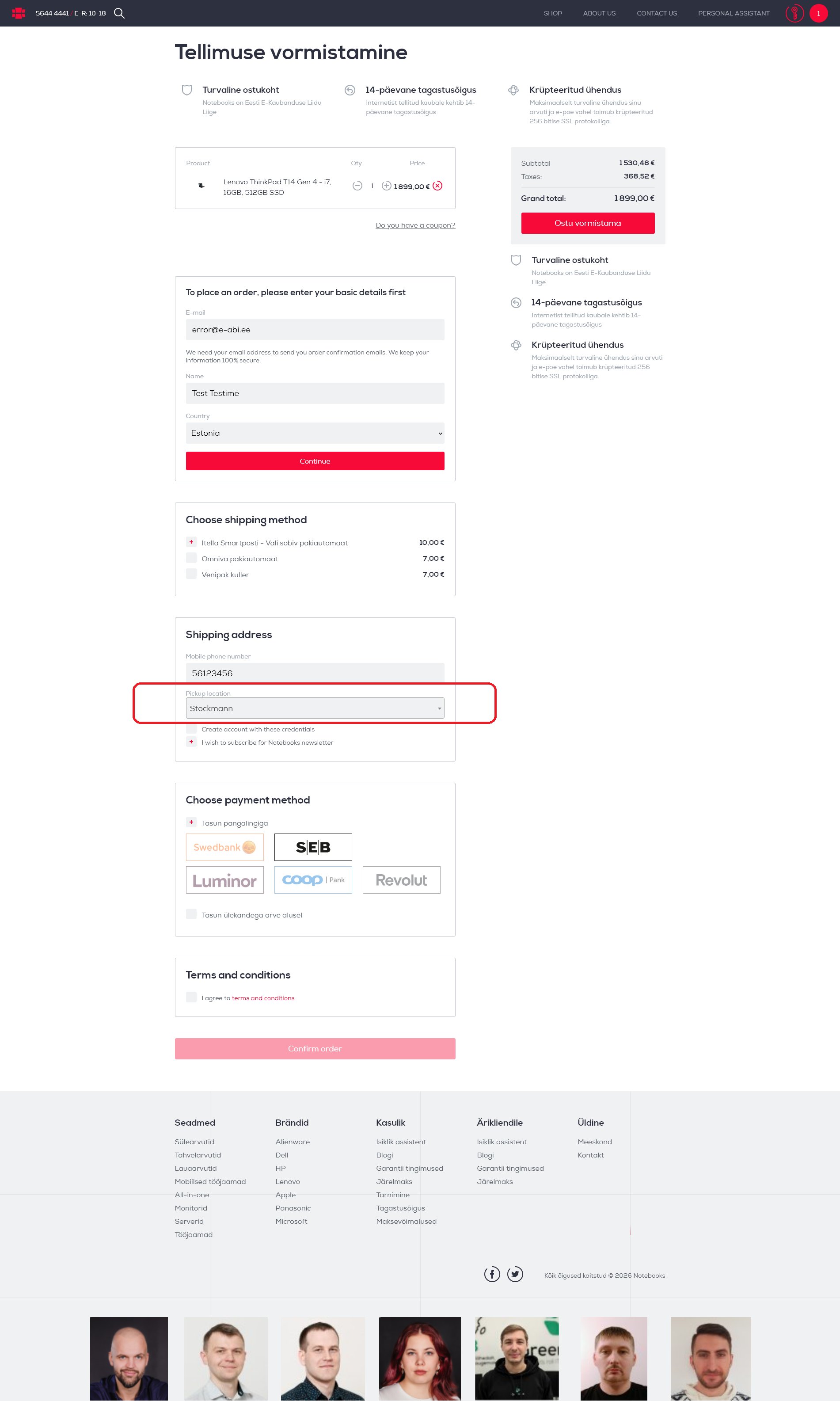
On my demo page shipping/payment options already work. Order is placed. Only loose end is the selected payment/shipping data forwarding.
Screenshot:

So no easy solution there? Maybe I should re-do it all with Magento backend instead and check how it works out.
Make shipping+payment services always 0 and the actual shipping/payment selection would be on my API connection page.
Once the customer confirms the order, it would add in cart 2 extra products (one shipping, one payment) that would represent the actual selected service with needed extra data such as selected pickup location or selected payment option.
Making all the needed shipping-payment services work on the Aimeos installation itself seems like too much hassle, because if a person selects a pickup location, then we should not ask a full address details from the customer.
On my demo page shipping/payment options already work. Order is placed. Only loose end is the selected payment/shipping data forwarding.
Screenshot:
So no easy solution there? Maybe I should re-do it all with Magento backend instead and check how it works out.
Re: Adding payment option to cart
In Aimeos, the pick-up delivery service option shows the configured pick-up locations of the delivery option from the admin backend which customers can select from. Therefore, you can only add the delivery option if the pick-up location is sent with the service ID of the delivery option.
According to your design, both are separate in your case. You can use JS in the frontend to show the pickup locations only when "pickup" is selected as delivery option and post both values at once. This would be the recommended approach but you are also free to implement a custom service provider which works as you want.
According to your design, both are separate in your case. You can use JS in the frontend to show the pickup locations only when "pickup" is selected as delivery option and post both values at once. This would be the recommended approach but you are also free to implement a custom service provider which works as you want.
Professional support and custom implementation are available at Aimeos.com
If you like Aimeos, give us a star
If you like Aimeos,
give us a starRe: Adding payment option to cart
I am trying to implement a custom Delivery provider, but the provider does not show up in the list, when I want to add it.
I can confirm, that composer loads the class up properly.
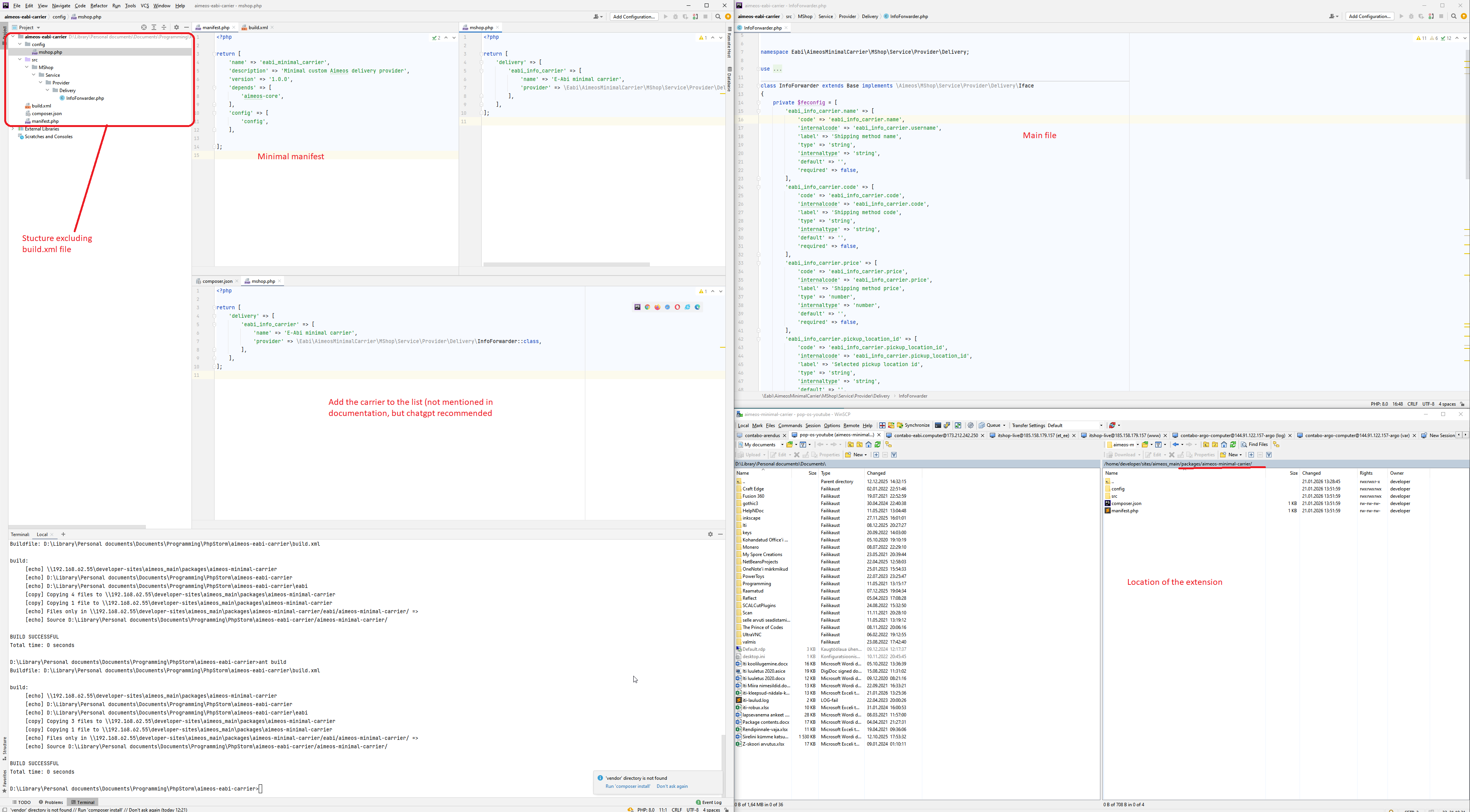
On the screenshot I have my project structure.
Can you point out, what am I missing?
Also this "mshop.php" was ChatGPT recommendation. In the documentation it says nothing about it.
ChatGPT seems to be confused about the topic, which leads me to believe that AimeOS may have changed its code structure over the course of time.
I can confirm, that composer loads the class up properly.
On the screenshot I have my project structure.
Can you point out, what am I missing?
Also this "mshop.php" was ChatGPT recommendation. In the documentation it says nothing about it.
ChatGPT seems to be confused about the topic, which leads me to believe that AimeOS may have changed its code structure over the course of time.
Re: Adding payment option to cart
Got it to appear.
Added the following statement to "manifest.php"
But this landed me on top of another problem.
Is it really mandatory to make extension class to start with "\Aimeos"
I would like to use another prefix, so then I can be sure not to pollute Aimeos namespace.
Added the following statement to "manifest.php"
Code: Select all
    'include' => [
        'src',
    ],
Code: Select all
Class "\Aimeos\MShop\Service\Provider\Delivery\InfoForwarder" not found
I would like to use another prefix, so then I can be sure not to pollute Aimeos namespace.
Re: Adding payment option to cart
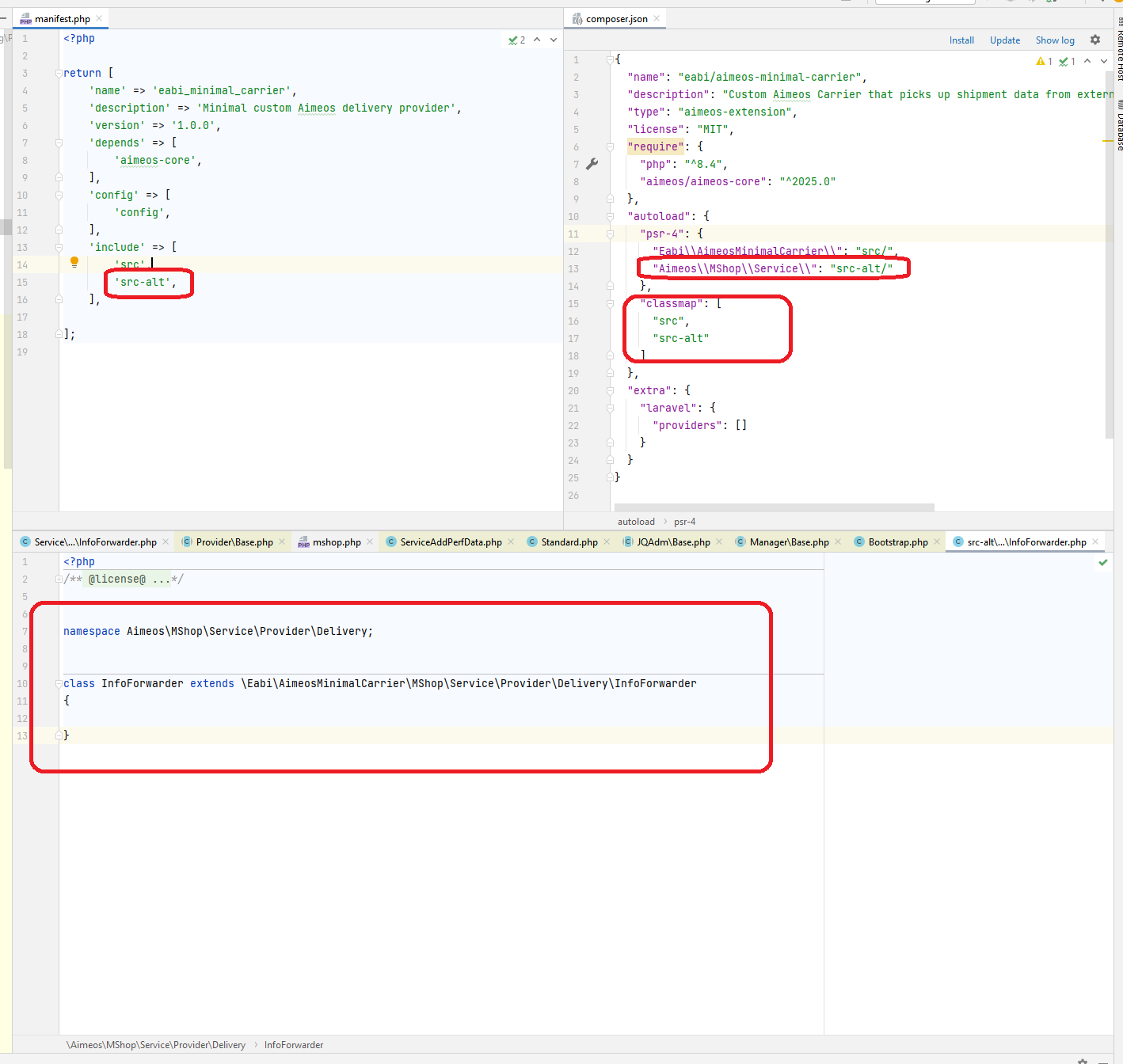
Ok, resolved all errors, tricked the composer a little bit.
Added an extra class into AimeOS namespace that extends my custom namespace.
Don't like the solution, but here is the screenshot. And at least it works.

Added an extra class into AimeOS namespace that extends my custom namespace.
Don't like the solution, but here is the screenshot. And at least it works.