 Star Repo
Adding payment option to cart
Forum rules
Always add your Aimeos and PHP version as well as your environment (Linux/Mac/Win)
Spam and unrelated posts will be removed immediately!
Always add your Aimeos and PHP version as well as your environment (Linux/Mac/Win)
Spam and unrelated posts will be removed immediately!

Re: Adding payment option to cart
Just use the Aimeos namespace. Then, you don't need your workaround:
Place the class in your Aimeos extension in ./src/MShop/Service/Provider/Delivery/InfoForwarder.php
Code: Select all
namespace Aimeos\MShop\Service\Provider\Delivery

class InfoForwarder
{
}
Professional support and custom implementation are available at Aimeos.com
If you like Aimeos, give us a star
If you like Aimeos,
give us a star
Re: Adding payment option to cart
This is the thing that I wanted to avoid. And it halfway worked. The payment method became listed under the menu, but when doing the checkout itself, then it started demanding the class to be inside Aimeos namespace.aimeos wrote: 25 Jan 2026, 14:15 Just use the Aimeos namespace. Then, you don't need your workaround:Place the class in your Aimeos extension in ./src/MShop/Service/Provider/Delivery/InfoForwarder.phpCode: Select all
namespace Aimeos\MShop\Service\Provider\Delivery

class InfoForwarder
{
}
But another question.
I have a code like this:
Code: Select all
    /**
     * Calculate delivery price using the "price" attribute
     */
    public function calcPrice(\Aimeos\MShop\Order\Item\Iface $basket, array $options = []
    ): \Aimeos\MShop\Price\Item\Iface
    {

        $manager = \Aimeos\MShop::create( $this->context(), 'price' );

        $price = $manager->create();
        $price->setCosts( (double)($options['eabi_info_carrier.price']??0) );
        return $price;
    }
Also how can I make the payment "paid" or "authorized" right away at the moment of order placement?
Re: Adding payment option to cart
To add tax, use the setTaxRate() method to add the tax rate in percent.
The order must be is set to "authorized" or "received" if the payment was the successful in the updateSync() method (and updatePush() if you use a payment service provider):
https://aimeos.org/docs/latest/provider ... us-updates
The order must be is set to "authorized" or "received" if the payment was the successful in the updateSync() method (and updatePush() if you use a payment service provider):
https://aimeos.org/docs/latest/provider ... us-updates
Professional support and custom implementation are available at Aimeos.com
If you like Aimeos, give us a star
If you like Aimeos,
give us a starRe: Adding payment option to cart
Ok, taxes now work. Thanks!
But the payment stuff still does not work.
I am using this API call:
https://aimeos.org/docs/latest/frontend ... eate-order
I want the order payment to be authorized right away at the order placement. Not later. Because my external system collects the payment before sending out the order details.
If I place the order via regular Aimeos frontend and use "PostPay" as payment provider, then the payment is immediately authorized after the order placement. But if I do that over the API (see link above) then the order is not authorized.
But the payment stuff still does not work.
I am using this API call:
https://aimeos.org/docs/latest/frontend ... eate-order
I want the order payment to be authorized right away at the order placement. Not later. Because my external system collects the payment before sending out the order details.
If I place the order via regular Aimeos frontend and use "PostPay" as payment provider, then the payment is immediately authorized after the order placement. But if I do that over the API (see link above) then the order is not authorized.
Re: Adding payment option to cart
Do you add a "PostPay" option as payment service provider over the API too?
Professional support and custom implementation are available at Aimeos.com
If you like Aimeos, give us a star
If you like Aimeos,
give us a starRe: Adding payment option to cart
Well, I did not. I just copied some of the code from it to my custom payment method.aimeos wrote: 02 Feb 2026, 11:20 Do you add a "PostPay" option as payment service provider over the API too?
But now I did the tests.
First I created an order over the API using PostPay. Placed order was not authorized.
Then I created same order over the frontend using PostPay. This time placed order was authorized.
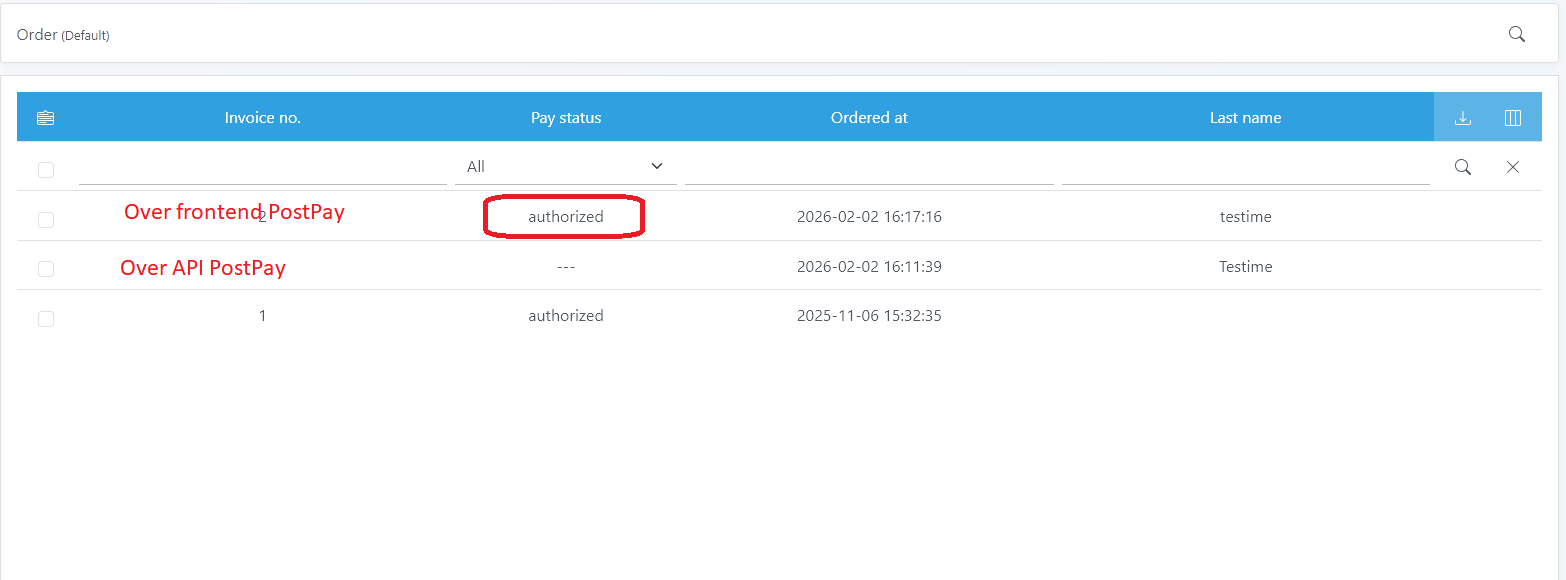
But I am not planning to use PostPay itself, I was just looking at its code to figure out, on how to get the order as Authorized at the moment of order creation.
Re: Adding payment option to cart
You need to set a payment option. Otherwise:
- the order can't be created by default due to ServicesAvailable basket plugin
- or the order will be in payment unfinished state if you disable ServicesAvailable basket plugin
- the order can't be created by default due to ServicesAvailable basket plugin
- or the order will be in payment unfinished state if you disable ServicesAvailable basket plugin
Professional support and custom implementation are available at Aimeos.com
If you like Aimeos, give us a star
If you like Aimeos,
give us a starRe: Adding payment option to cart
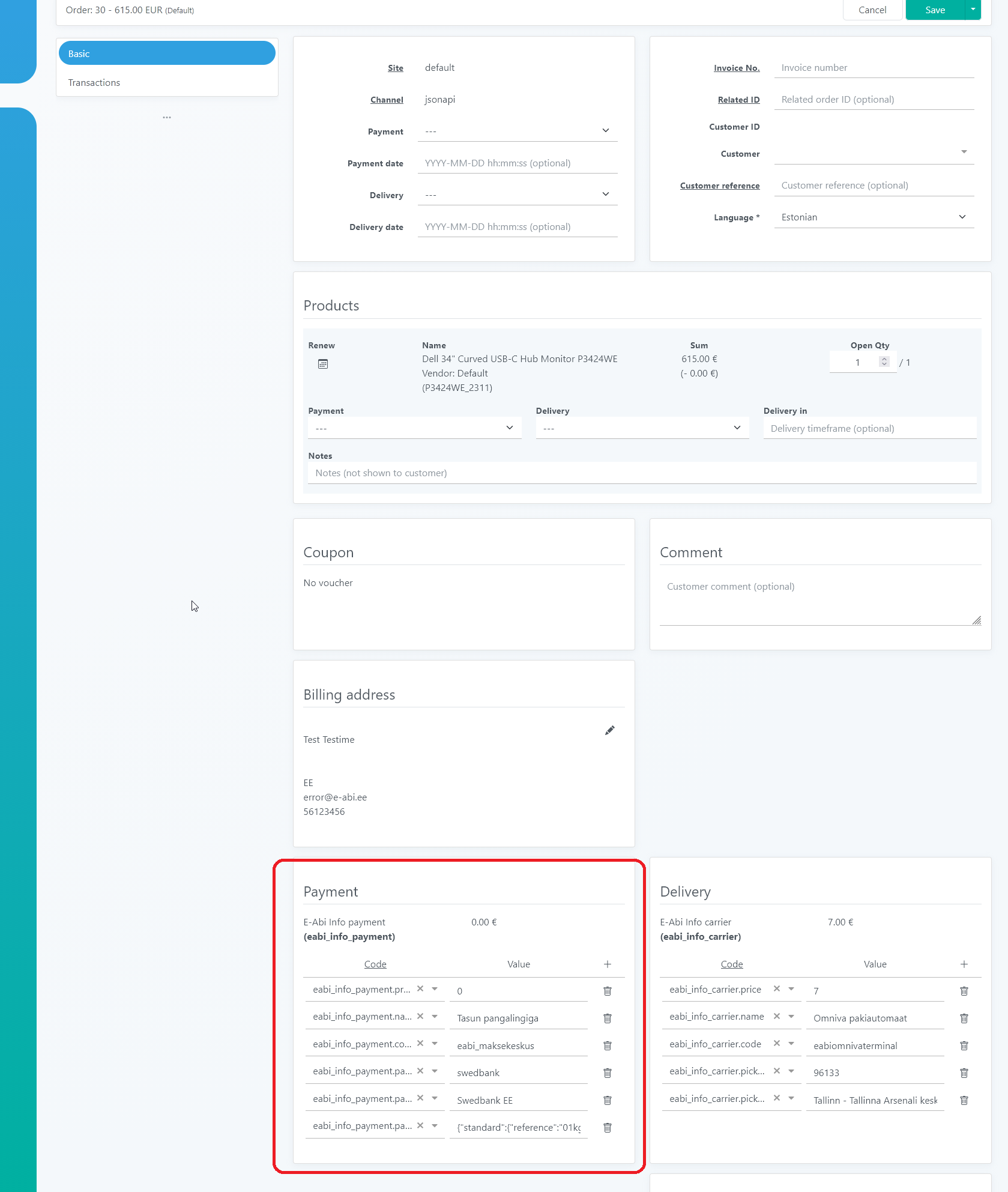
I have the payment option.
The order is created just fine.
Only the order state is incorrect. It should be "authorized" or any other state so it would not be auto-deleted.
Picture:

Or what kind of "payment option" are you exactly talking about?
The order is created just fine.
Only the order state is incorrect. It should be "authorized" or any other state so it would not be auto-deleted.
Picture:
Or what kind of "payment option" are you exactly talking about?
Re: Adding payment option to cart
If you use your own payment service provider, you have to set the payment status in the updateSync() method of your service provider.
Professional support and custom implementation are available at Aimeos.com
If you like Aimeos, give us a star
If you like Aimeos,
give us a starRe: Adding payment option to cart
I have it. Copied the method from \Aimeos\MShop\Service\Provider\Payment\PostPay
But the end result is the same. Order is not authorized, when it is placed over the JSON API, but it is authorized when I place the order via regular AimeOS frontend.
Same thing with default PostPay provider.
But the end result is the same. Order is not authorized, when it is placed over the JSON API, but it is authorized when I place the order via regular AimeOS frontend.
Same thing with default PostPay provider.